There’s a big catch in vibe coding that most builders discover when it’s too late.
Getting to 80% is easy. You prompt the tool, get a working prototype in minutes. The preview looks sharp. The demo runs clean.
Then you try to ship it. And things start falling apart.
That final 20% stretch is when you really see the cracks in the wall and come across errors you can't even parse. And now you're stuck in a loop of patches and fixes, burning through credits, and wondering why everyone else makes this look easy. You’re not alone.
We hosted Abhijeet Jha from Lovable for a tactical workshop on this exact problem. This guide walks you through what he shared: how to actually build and ship with vibe coding, not just demo.
What exactly is vibe coding?
Vibe coding is the process of building software by describing what you want instead of coding how to build it. Instead of writing code line by line, you describe the outcome you want and let AI figure out the implementation as the developer.
The core idea: rapid prototyping through conversation. You refine the ask and AI makes adjustments until you have something functional, without touching the underlying code yourself.
Vibe coding collapses the traditional development workflow: PM writes specs, designer mocks it up, developer builds, something's off, back to PM, designer tweaks, developer fixes, repeat. Now one person can do all of it in the same place.
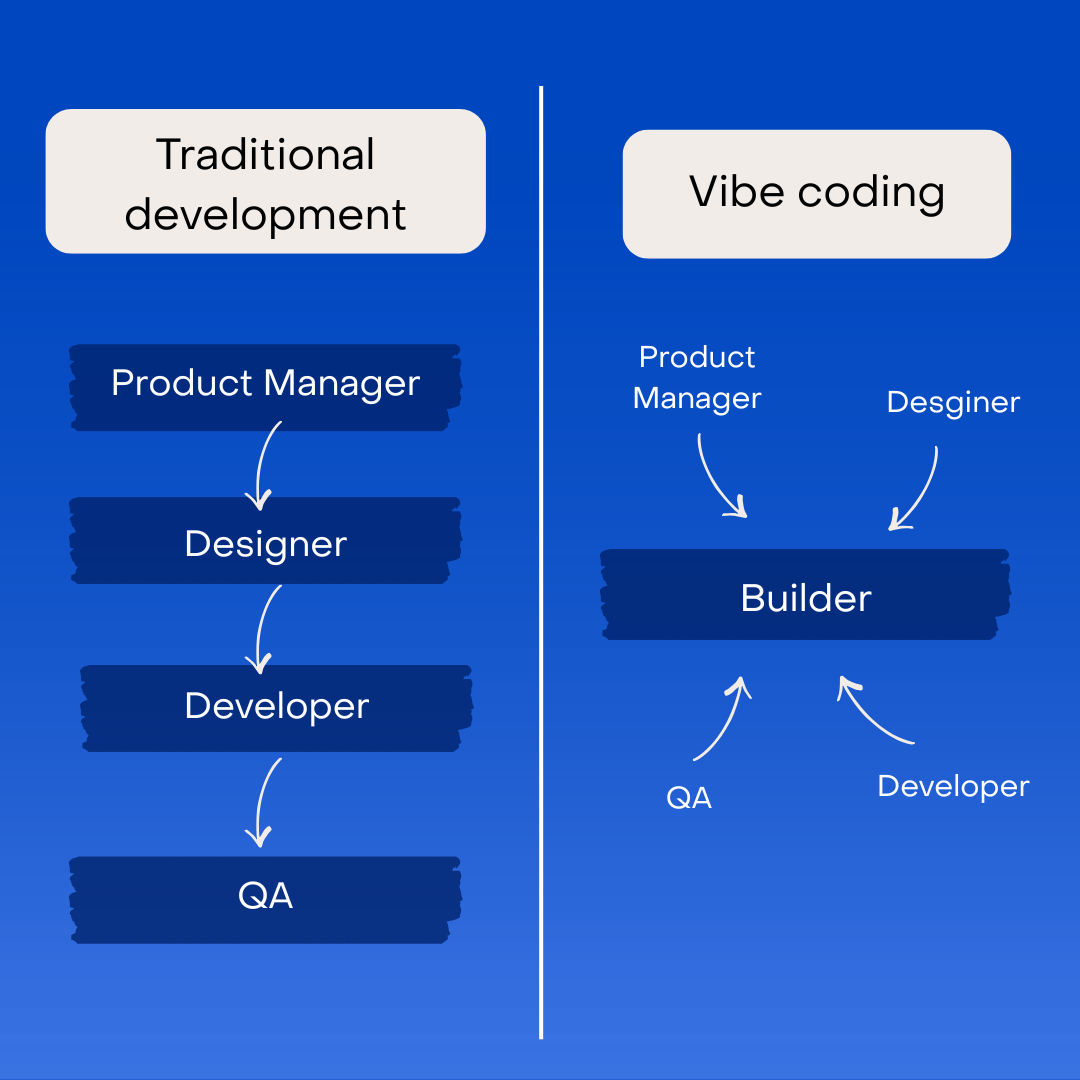
It also eliminates the need to learn programming languages. You don't need to understand Java, JavaScript, or Python syntax. And the need to learn how to write a loop, declare a variable, or structure a class.
However, vibe coding doesn't eliminate the need to understand software. You still need to understand, at a high level, how software works. You need a fundamental understanding of different app components. And most critically, you still need clear product thinking.
The fundamental rule: Your prompt is only as good as your clarity.
How vibe coding is changing product development
For years, teams would spend weeks writing PRDs, getting them reviewed, converting them to TRDs, and getting those reviewed before writing a single line of code. The PRD was used as a proxy for clear thinking.
Vibe coding flipped this equation.
Google, historically famous for its write-first culture, moved to build-first. Madhu Muthukumar, Head of Product at Google, put it simply: if vibe coding a prototype takes the same time as writing a PRD, show don't tell.
This shift has created a new builder class. These are people who understand products and users but couldn't build without learning to code.
Why most vibe coding prototypes fail
Imagine you walk up to someone and say: “Build me an expense tracker.”
What happens next?
They have no idea what your UI should look like. Is it a simple form? A dashboard with charts? Does it look like an app or a spreadsheet? Should it be minimalist or feature-rich?
They don't know your logic requirements. Should it categorize expenses automatically? Calculate tax deductions? Send budget alerts? Just store and display data?
They don't know what data to store. Just amount and date? Categories and tags? Receipt images? Recurring expenses? Multiple currencies?
So they guess. Some guesses are right, most are wrong. And now you're stuck.
This is exactly what happens when you give AI a zero-shot prompt to build something. You face three critical challenges.
1. Loss of control
When you work with a vague prompt, you’re leaving too much to the tool’s discretion.
The tool defines the architecture, the tech stack, the user experience, and everything else. Instead of building your vision, you're now AI's interpretation of your vision.
People use vibe coding because they want more control over building products. But vague prompts give them less control than traditional development ever did.
2. Expensive token drain
Unclear prompts force AI to think a lot.
The tool reads your minimal requirements, realizes it needs to make decisions, and starts exploring possibilities. It considers different UI frameworks, evaluates database schemas, and more. All of that thinking consumes massive amounts of tokens.
The more specific you are, the less AI has to think about what you want. It can focus on implementation instead of interpretation, saving tokens and overall cost.
3. Difficult to debug
When you don’t specify requirements, the AI makes assumptions about everything. When something breaks, where do you even start fixing it? You don't know which of the 100 assumptions caused the problem.
Debugging requires understanding what was built. But you never specified what to build, so you're reverse-engineering AI's thought process.
How to build functional products with vibe coding
Abhijeet’s biggest piece of advice for anyone exploring vibe coding was this:
“Start with intention. Before opening Lovable or any tool, you should ask yourself: what am I building, and who is it for? I would say that your prompt is only as good as your clarity.”
Instead of jumping straight into it, grab a piece of paper or open a doc. Spend 5-10 minutes mapping your project into three blocks: UI, Logic, and Data.
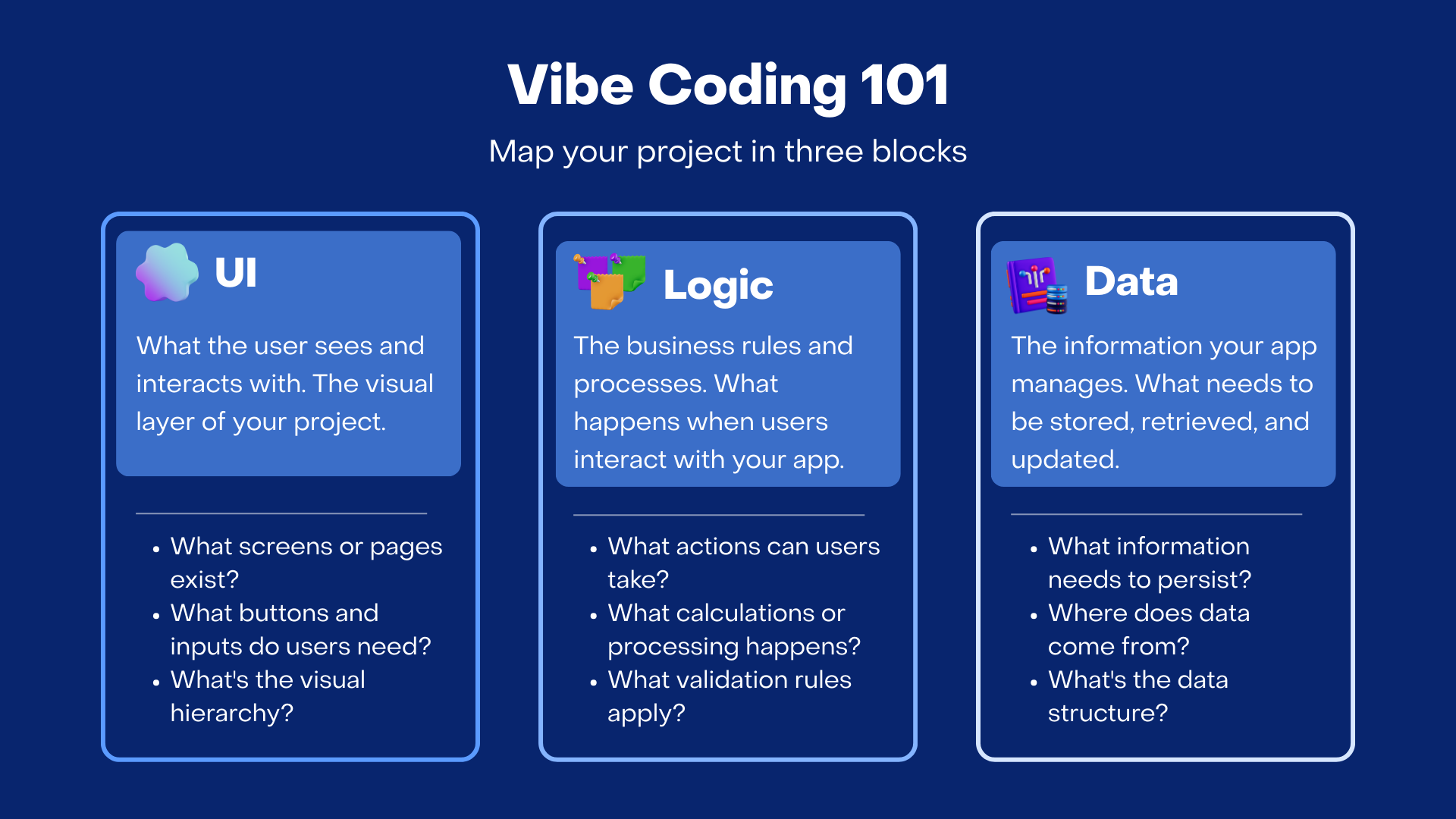
Block 1: User interface (What your users see)
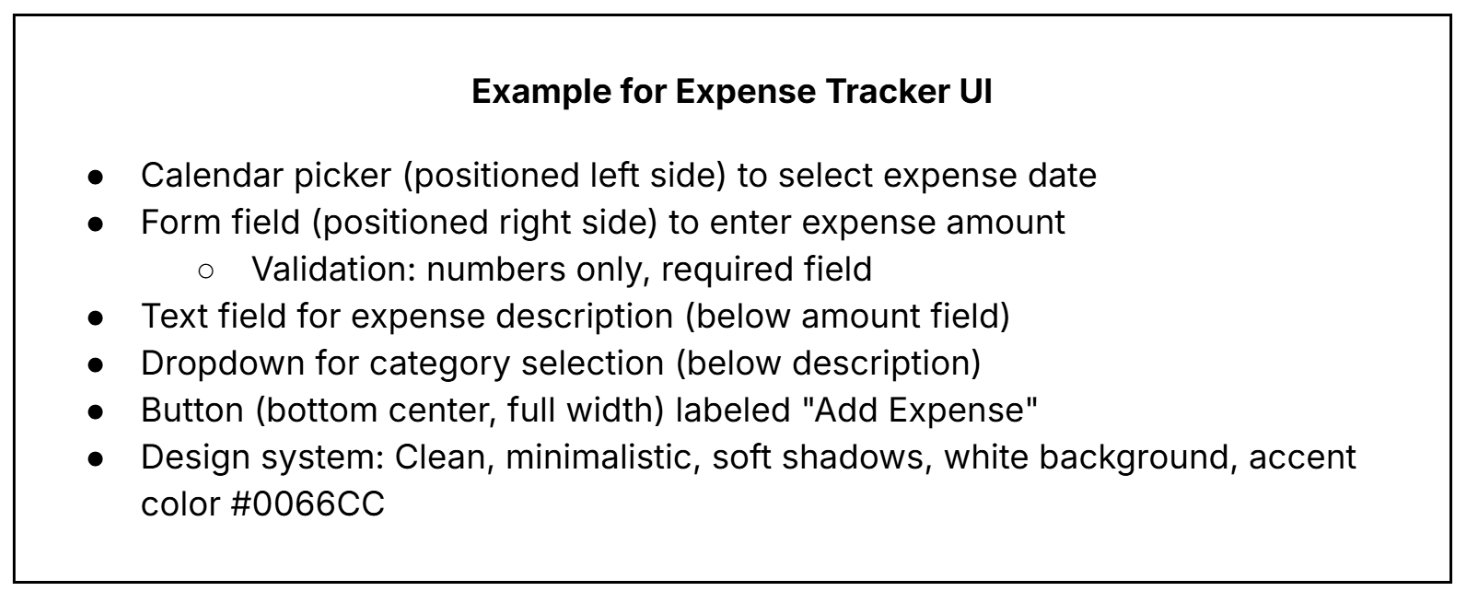
List the exact components you need for the prototype. For an expense tracker, this could include calendar picker, form fields, buttons, cards, modals, dropdowns.
Once you have a list of UI components, be precise about their placement: calendar on left side, form on right side, button centered at bottom. It also helps to define your design system at the beginning. It could be minimalistic, cinematic, playful, or something else.
Add references for inspiration to further elaborate on your design expectations.
Block 2: Logic (What the app does)
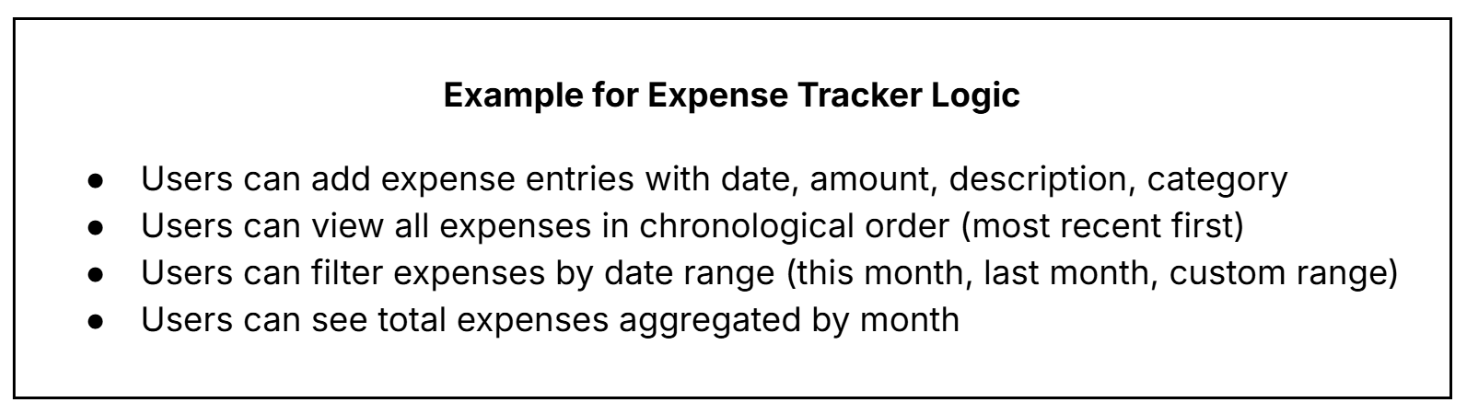
At this stage, define user actions and their outcomes. Think about:
- What can users do?
- What happens when they take an action?
- What validations and rules apply?
- What do you explicitly NOT want?
This is the part where you define your product’s functionality with logic. Jot down the key features and actions you want users to take.
Block 3: Data (What information persists)
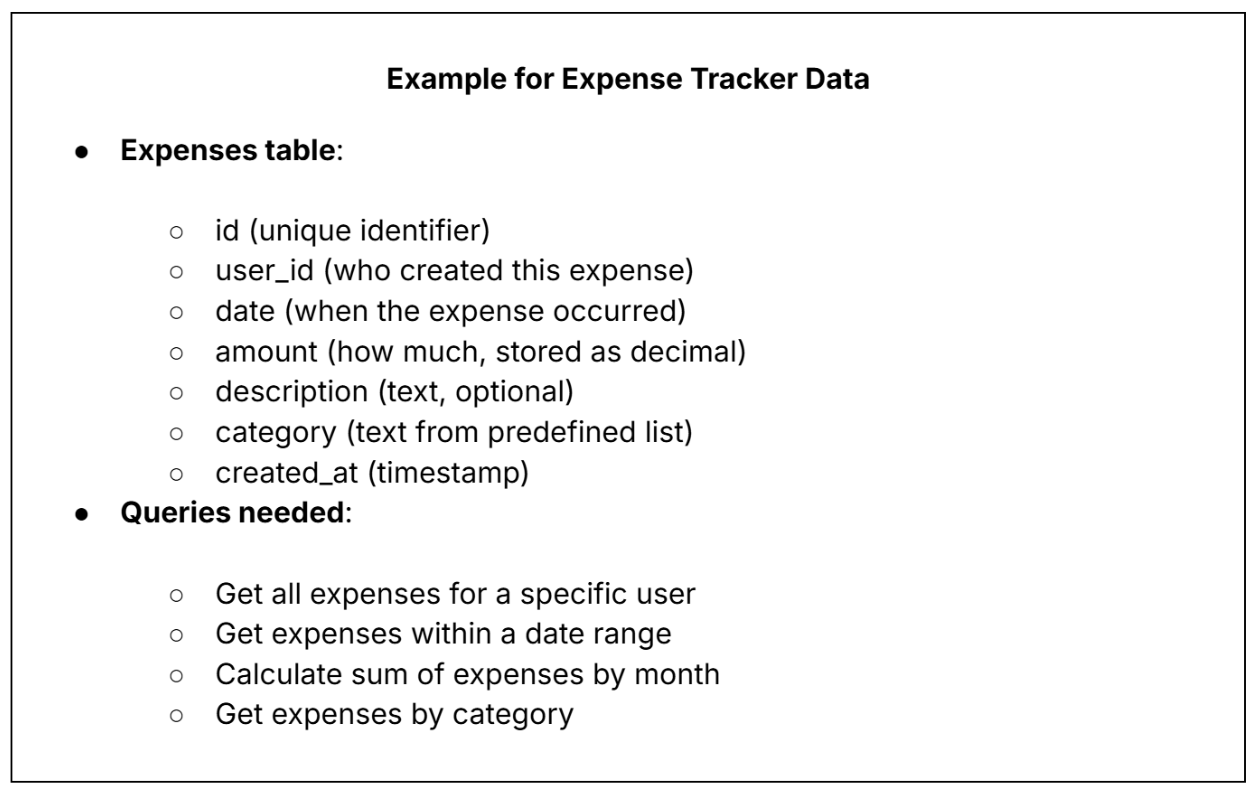
Think about storage from the user's perspective:
- What needs to be saved for users to access later?
- What relationships exist between different data types?
- What queries will you need to run?
Think through what data makes your product work.
The Incremental Building Method
Once you've planned these three blocks, build in small, verifiable steps.
By building incrementally, you see how the UI connects to logic and connects to data. And you understand your product's architecture with better clarity.
At every checkpoint, you're confirming the app does what you intended before adding complexity. Since each step is verifiable, you know immediately if something breaks and why. You’re in the driver’s seat.
Abhijeet also shares how Lovable works best when you prompt one section at a time.
“You should not simply say build a landing page. Rather, be as specific as creating a hero with a large headline, supporting text, and CTA, and then move to the next block. Be very specific about how the landing page should look like, what should be the CTA, what should be the button text and so on.”
Here’s what this approach could look like in practice:
Prompt #1: Create a simple text input field and display whatever is typed into it below the field.
Run the test: Type something. Does it appear? Yes? Continue.
Prompt #2: Add a number input field to the right of the text field. It should only accept numbers. Add a label 'Amount' above it.
Run the test: Try typing letters. Does it reject them? Try typing numbers. Does it accept them? Yes? Continue.
Prompt #3: Add a date picker to the left side. Label it 'Date'. Default to today's date.
Run the test: Click the date picker. Can you select dates? Does it default to today? Yes? Continue.
Prompt #4: Add a button at the bottom center, full width, labeled 'Add Expense' with background color #0066CC and white text.
Run the test: Does the button appear correctly styled? Yes? Continue.
Prompt 5: When the button is clicked, create a row below that displays: Date | Description | Amount. Stack these rows vertically.
Run the test: Click the button. Does a row appear with the entered data? Add multiple expenses. Do they stack? Yes? Continue.
Prompt 6: Connect to Lovable Cloud. Create an expenses table with columns: id, date, description, amount, created_at. When the button is clicked, save the entry to this table and fetch all entries to display.
Run the test: Add an expense. Refresh the page. Does the expense persist? Yes? You have a working MVP.
Vibe coding best practices to ship without breaking
When you’re in the thick of it, these best practices will come in handy to take you from zero to one.
1. Master chat vs. agent mode
Most vibe coding tools offer two modes:
- Chat Mode (Planning): Use this for thinking, not building by asking questions like "What database tables should I create for a workout tracking app?" or "Explain the API structure you'd recommend for user authentication.” Chat mode uses minimal tokens since it’s meant for planning and learning.
- Agent Mode (Building): Use this only when your plan is crystal clear. This is where AI actually writes code, creates components, modifies files, sets up databases. Every action consumes significant tokens because AI reads your entire codebase to understand what to change.
Pro tip: Use ChatGPT or Claude to refine your prompts before submitting them. Paste your rough idea into ChatGPT and let it ask clarifying questions, then use its refined output in Lovable.
2. Use Visual Edit on Lovable
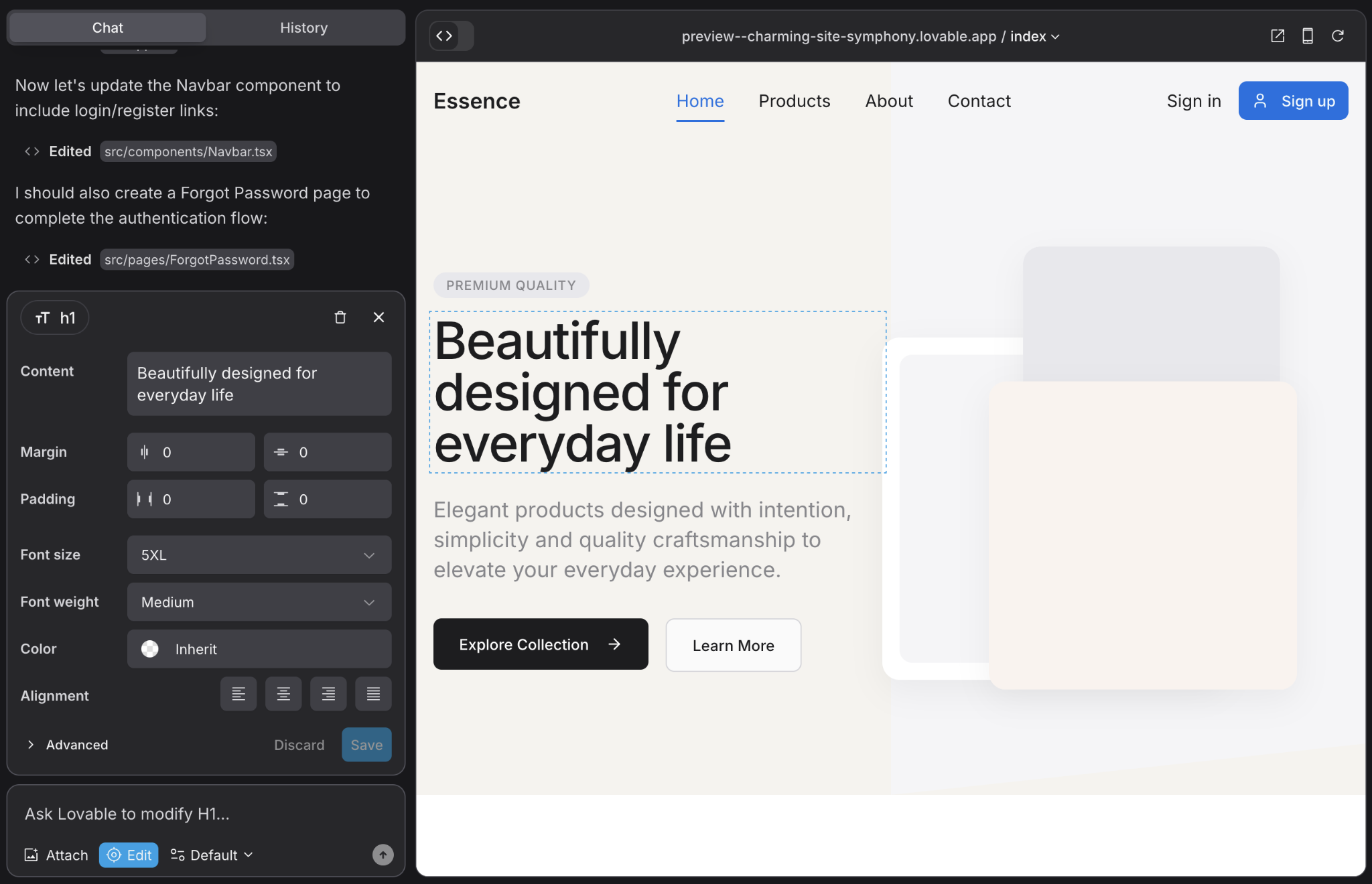
Text-based descriptions of location are ambiguous. "The button on the right" could mean five different buttons.
Lovable’s Visual Edit works well for changing specific component styles and moving elements to exact positions. You can also modify one instance when multiple similar components exist while fine-tuning spacing and alignment.
Abhijeet shares:
“Visual Edit helps AI navigate the exact position where you want to make the change. As an example for the visual URL, you can write something like “embed a product demo video from midjourney,” and then you provide a URL. You can also say about the position that ok, place it below the feature section in a full width card with a soft shadow.”
3. Add your database early
Most users build the UI first, get it working with fake data, then try to add a real database. This causes AI to rewrite everything, and the fake data structure rarely matches the real database structure.
If you know your product needs storage, add the database in your first or second prompt. Abhijeet explains why this is one of his key principles for building.
“If I know my product is going to use a database, I would rather introduce the database in the beginning of the development journey itself. The front end and the back end has to interact with each other in the form of APIs and the backend has to then interact with the database in the form of queries. So the earlier you will add the database, the tool can plan early.”
4. Consider version history as your safety net
Version history on Lovable is powered by GitHub in the background. Each message with changes creates a commit. You can always go back to any previous state. Abhijeet shares how this works:
“Lovable, by default, uses GitHub as the version control internally. So it gives you the restore option on every message. You can restore any checkpoint if you don’t like the change and go back to the previous state.”
Here’s how the incremental building approach creates a restore point with every prompt:
Make a change → Test it → If it works, continue → If it breaks, restore
Start your next vibe coding project
The big difference between builders who ship and those who get stuck is intentionality.
The ones who make it past 80% know exactly what they're building before they write the first prompt. They plan for edge cases instead of discovering them in production. They think in systems, not just features.
Use this playbook to go from prototype to production without getting stuck in a loop of errors and fixes.
And remember that vibe coding gives you speed. What you do with that speed—whether you use it to iterate thoughtfully or just move fast and break things—that's entirely on you.
.png)